

How do you get started with DIY SEO using Hike SEO?

Doing SEO yourself with Hike SEO starts with one simple action: connect your website to the platform. From there, Hike performs an automatic site crawl that surfaces technical and on-page issues you might never have spotted manually. The platform then organizes those issues into prioritized tasks across local SEO, onsite SEO, and platform-specific actions, each with a time estimate so you can plan realistically.
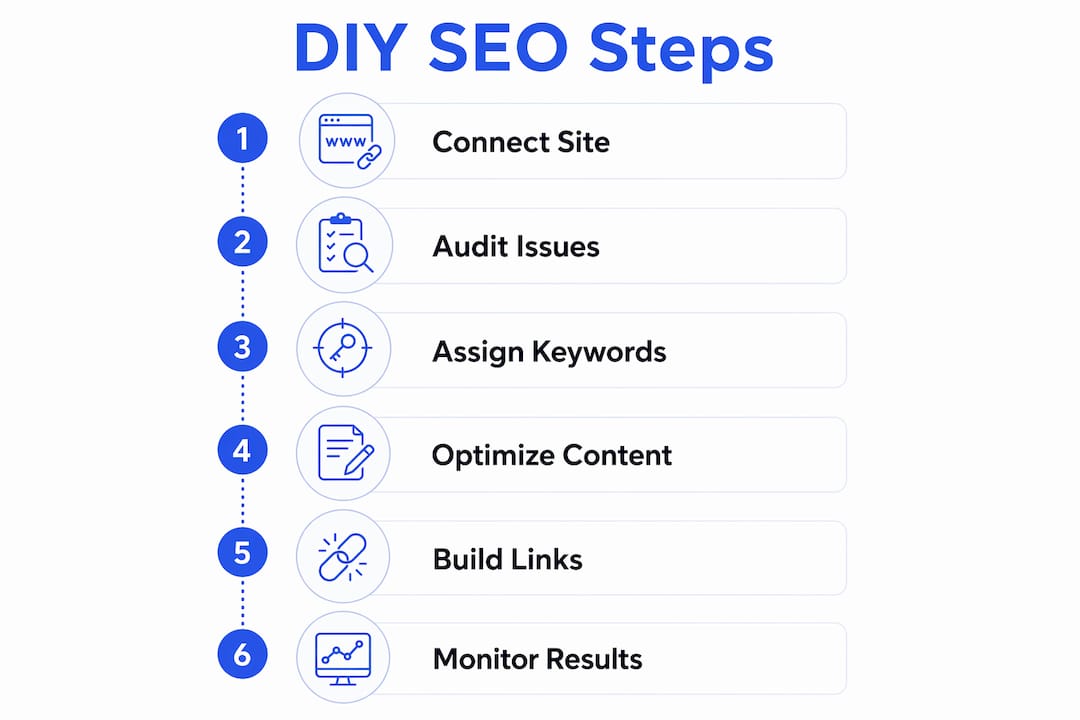
Here’s what the core workflow looks like at a glance:
- Connect your site and let Hike crawl it for issues automatically
- Review your action list, sorted by priority and estimated completion time
- Map keywords using Hike’s Keyword Sitemap, assigning 3–4 keywords per page to keep each page focused
- Validate keyword choices with Hike’s AI Review tool, which checks alignment between your mapped keywords and actual page content
- Edit live SEO elements through the On-Site Optimizer without touching a single line of code
- Track progress using Hike’s built-in reports and performance dashboards
For freelancers building remote income around SEO services, this workflow is genuinely practical. You don’t need a developer, a big budget, or years of experience to start seeing results.
Table of Contents
- Step-by-step: how to self-manage SEO with Hike SEO tools
- Why understanding SEO concepts makes you a better freelancer
- How do AI crawlers change what modern SEO requires?
- How to fix common SEO issues Hike SEO identifies
- Link building basics and how they work alongside Hike SEO
- How to use Hike SEO to optimize for mobile and page speed
- Why mastering Hike SEO opens real remote freelancing opportunities
- Key Takeaways
- Why the “just follow the tool” approach has a ceiling
- FAQ
Step-by-step: how to self-manage SEO with Hike SEO tools
Follow these steps in order. Each one builds on the last.
-
Connect your website. Log into Hike, click “Connect Website,” and verify site ownership. Hike will begin crawling your site within minutes, identifying issues across technical SEO, on-page elements, and local presence.
-
Review your SEO actions. Head to the Actions section in the top menu. You’ll see your monthly goal completion percentage and a full list of tasks grouped by category. Click any action to see what needs fixing, why it matters, and how long it should take.
-
Plan your weekly workload. Hike’s task manager estimates time per action, so you can realistically schedule 2–3 hours of SEO work per week without burning out. Prioritize quick wins first to build momentum.
-
Build your Keyword Sitemap. Go to the Keywords section, add seed phrases related to your business, and review Hike’s suggestions by search volume and difficulty. Assign a small number of keywords per page. Use the AI Review tool to confirm your choices align with each page’s actual content.
-
Use the On-Site Optimizer for live edits. Add Hike’s JavaScript snippet to your site’s header once (the same process as installing Google Analytics). Then open any page inside the Hike editor, click on a title, heading, or image, and edit directly. Hit Publish and changes go live instantly, fully crawlable by Google. You can update meta titles, meta descriptions, H1 headings, image alt text, internal links, and canonical tags, all without a developer.
-
Set up Google Search Console. Connect Search Console to Hike so performance data flows directly into your dashboard. Monitor impressions, clicks, and average position weekly. This integration also helps you spot crawl errors and coverage issues early.
-
Review Hike’s reports regularly. Use the Report Builder to generate branded SEO reports on a schedule. Track keyword rankings, organic traffic trends, and completed actions over time. Adjust your strategy based on what the data shows, not guesswork.
Pro Tip: Pace yourself. SEO compounds over weeks and months, not days. Completing five focused tasks per week consistently outperforms a single marathon session followed by weeks of inactivity.
Why understanding SEO concepts makes you a better freelancer
Hike tells you what to do. The Hike SEO Academy teaches you why it works. That distinction matters more than most beginners realize.
“We think it’s important that everyone understands why they make SEO changes to a website. We want all of our users to gain a great understanding of the SEO fundamentals so not only can you use Hike more effectively and efficiently, but so that you can upskill.” — Hike SEO Academy launch
The Academy is included with every Hike subscription and covers everything from technical SEO foundations to backlink auditing. Each course combines video lessons with a quiz so you can test your understanding and apply it immediately. For agency users, the videos are fully white-label, meaning you can offer them directly to clients as part of your service package.
Why does this matter for freelancers specifically? A few reasons:
- Client communication: When you understand why a page title matters, you can explain it confidently to a client instead of just saying “the tool told me to.”
- Better task execution: SEO Academy courses help you recognize which automated suggestions are high-priority and which can wait.
- Handling technical complexity: Some SEO issues, like server-side rendering problems or complex redirect chains, go beyond what automation can fully resolve. Foundational knowledge helps you know when to escalate to a specialist.
- Freelance credibility: Clients pay more for someone who understands SEO strategy, not just someone who follows a checklist.
Pairing Hike’s automation with Academy knowledge is what separates a capable freelancer from one who just runs the tool. If you’re also building out your freelance social media marketing services, SEO knowledge adds a layer of value that most social media freelancers don’t offer.
How do AI crawlers change what modern SEO requires?
Google is no longer the only search engine that matters. AI-powered tools like ChatGPT, Perplexity, and Claude now surface web content in response to user queries, and they use their own crawlers to index sites. GPTBot and ClaudeBot are two examples. If your site blocks these bots in its robots.txt file, your content won’t appear in AI-generated answers.
Modern SEO requires you to think about visibility across multiple discovery channels. Here’s how to stay ahead:
- Check your robots.txt file. Make sure GPTBot, ClaudeBot, and similar AI crawlers are not blocked. Google Search Console and Bing Webmaster Tools both help you monitor crawl access and identify technical barriers.
- Write for clarity, not just keywords. AI systems favor content that answers questions directly and completely. Clear structure, logical headings, and concise answers improve your chances of being cited.
- Keep your site technically sound. Fast load times, clean HTML, and proper schema markup help both traditional and AI crawlers understand your content.
- Monitor regularly. Search Console data shows you which queries drive impressions and clicks. Shifts in that data often signal algorithm changes before they become obvious.
- Update content consistently. AI search engines tend to favor fresh, authoritative content. A page that hasn’t been touched in two years is less likely to be surfaced than one updated recently.
The core SEO principles haven’t changed. What’s changed is the number of systems you need to be visible to.
How to fix common SEO issues Hike SEO identifies
When Hike flags an issue, it tells you exactly what to fix and why. Here’s how to work through the most common ones:
Missing or weak page titles: Open the On-Site Optimizer, navigate to the page, click the title element, and rewrite it to include your primary keyword naturally. Keep it under 60 characters. Publish immediately.
Poor meta descriptions: These don’t directly affect rankings, but they drive click-through rates. Write a compelling 150–160 character description that includes your target keyword and gives users a reason to click. Edit and publish through the On-Site Optimizer.
Missing H1 headings: Every page should have exactly one H1 that clearly states the page’s topic. If Hike flags a missing or duplicate H1, fix it through the On-Site Optimizer without touching your CMS.
Images without alt text: Click the image in the On-Site Optimizer editor and add a descriptive alt tag that includes a relevant keyword where natural. This helps both SEO and accessibility.
Keyword mapping gaps: If Hike shows pages with no keywords assigned, go to your Keyword Sitemap, add the page, and assign 3–4 relevant keywords. Run the AI Review to validate your choices.
Crawl errors: These show up in Google Search Console. Fix broken internal links by updating the destination URL. For 404 errors on deleted pages, set up a 301 redirect to the most relevant live page.
Link building basics and how they work alongside Hike SEO
Hike handles on-page SEO well. Link building is the off-page complement that amplifies everything you’ve already fixed.
A backlink is a link from another website pointing to yours. Google uses links to discover new pages and to assess a site’s authority. More links from credible, relevant sites generally means higher rankings. Quality matters far more than quantity.
Practical link building approaches that work alongside Hike:
Guest posting: Write an article for a relevant blog or publication in your niche. Include a natural link back to a page you’ve already optimized in Hike. This drives both referral traffic and ranking authority.
Resource page outreach: Find pages in your industry that list helpful tools or guides. If your content fits, email the site owner and suggest adding your link.
Internal linking: Hike’s On-Site Optimizer lets you add internal links directly to any page. Connect related pages to distribute authority across your site and help Google understand your content structure.
Content worth linking to: The most reliable link-building strategy is creating genuinely useful content. Guides, original data, and tools attract links naturally over time.
Track your backlink profile through Hike’s reports and Search Console. A sudden drop in referring domains is worth investigating.
How to use Hike SEO to optimize for mobile and page speed
Mobile performance and page speed are confirmed Google ranking factors. Hike surfaces related issues in your action list, and fixing them follows a clear process.
Check mobile usability first. Google Search Console’s Mobile Usability report shows pages with touch element spacing issues, viewport configuration problems, or text that’s too small to read. Fix these at the CMS or theme level, then verify the fix in Search Console.
Use Google’s PageSpeed Insights alongside Hike. Enter your URL at PageSpeed Insights to get a Core Web Vitals score. The report breaks down specific issues: image sizes, render-blocking scripts, server response times. Address the highest-impact items first.
Compress images before uploading. Large image files are the most common cause of slow mobile load times. Use a tool like Squoosh or ShortPixel to reduce file size without visible quality loss, then update alt text through Hike’s On-Site Optimizer.
Minimize render-blocking resources. If your site loads JavaScript in the document head, move non-critical scripts to load after the main content. This is usually a theme or plugin setting in WordPress or Shopify.
Hike’s On-Site Optimizer is delivered through Fastly CDN, so the snippet itself adds no meaningful load time. Once your site is technically sound on mobile, the on-page optimizations you make through Hike will have a cleaner foundation to build on.
Why mastering Hike SEO opens real remote freelancing opportunities
Learning to do SEO yourself with Hike SEO isn’t just about your own website. It’s a transferable skill that clients will pay for.
Small business owners need SEO help but rarely have the budget for a large agency. A freelancer who can connect a client’s site to Hike, run a full audit, map keywords, fix on-page issues, and deliver a branded monthly report is offering genuine value at a price point that works for both sides. Hike’s white-label Academy content means you can even offer SEO education to your clients as part of a premium package.
The task manager’s time estimates make client project management straightforward. You can quote realistic timelines, show weekly progress, and avoid the scope creep that kills freelance relationships. That kind of transparency builds trust fast, which is how you get referrals.
If you’re just starting out, check out Remoteprofitly’s guide on getting your first freelance client to pair your new SEO skills with a client acquisition strategy. And if you want to understand how Hike compares to other tools you might encounter in client conversations, the Hike SEO vs Surfer SEO breakdown is worth reading before you pitch.
SEO skills built on a platform like Hike translate directly into online income opportunities that don’t require a fixed location or a 9-to-5 schedule.

Key Takeaways
Doing SEO yourself with Hike SEO is most effective when you combine the platform’s automation with foundational SEO knowledge from the Academy and consistent weekly task completion.
| Point | Details |
|---|---|
| Connect and crawl first | Link your site to Hike to trigger an automatic audit that identifies and categorizes every SEO issue. |
| Limit keywords per page | Assign 3–4 keywords per page in the Keyword Sitemap to keep content focused and avoid keyword dilution. |
| Edit live with no code | The On-Site Optimizer lets you update titles, H1s, and alt text instantly using a single JavaScript snippet. |
| Learn the why, not just the what | Hike SEO Academy courses help freelancers execute tasks confidently and communicate value to clients. |
| Prepare for AI search visibility | Allow AI crawlers like GPTBot in your robots.txt and monitor access through Google Search Console. |
Why the “just follow the tool” approach has a ceiling
Most people who pick up Hike SEO treat it as a checklist app. They complete the flagged actions, watch their score go up, and stop there. That approach works up to a point, and then it stalls.
The freelancers who build real income around SEO services are the ones who understand the reasoning behind each fix. When a client asks why their competitor outranks them despite having fewer backlinks, you need more than a task list to answer that. You need to understand content relevance, topical authority, and how Google evaluates page experience signals.
Hike’s automation is a genuine advantage, especially for beginners. But treating it as a replacement for SEO understanding rather than a starting point is where most people plateau. The Academy exists precisely because the Hike team knows this. Use it.
The other underrated move: start optimizing for AI search visibility now, before it becomes standard practice. Most small business sites still block AI crawlers by default. Fixing that for a client takes five minutes and gives you a talking point that most competitors won’t even know to mention.
FAQ
What does Hike SEO do when you first connect your site?
Hike performs an automatic crawl that identifies technical and on-page SEO issues, then organizes them into prioritized tasks with time estimates for each action.
How many keywords should you assign per page in Hike SEO?
Hike recommends assigning a maximum of 3–4 keywords per page in the Keyword Sitemap to maintain content focus and avoid keyword cannibalization.
Do you need coding skills to use Hike’s On-Site Optimizer?
No. You add a JavaScript snippet to your site once, then edit titles, headings, meta descriptions, and alt text visually inside the Hike editor. Changes publish instantly.
What is the Hike SEO Academy and who can access it?
The Hike SEO Academy is an included library of video courses covering SEO fundamentals, technical SEO, and backlink building. All Hike subscribers have access, and agency users can share white-label versions with their clients.
Why does AI crawler compatibility matter for SEO in 2026?
AI-powered tools like ChatGPT and Perplexity use their own crawlers to index content. If your robots.txt blocks those crawlers, your site won’t appear in AI-generated search results, limiting your overall visibility.
Recommended
- HIKSEO vs Surfer SEO: Which SEO Tool Delivers Better Results? – Social Media Job Search Community
- Ranked AI vs Semrush vs Ahrefs vs Surfer SEO 2026 – Social Media Job Search Community
- Generated Sections all – Social Media Job Search Community
- Direct Outreach for Social Media Roles: A 2026 Guide – Social Media Job Search Community